Showing posts with label Cydia Apps. Show all posts

Tuesday, February 8, 2011

Barrel:iphone hack to spin springboard icons


One thing that can get boring with an iphone is the way you change its springboard pages by swiping it. one movement fast page swipe is very responsive works perfect but eventually you will be bored of this and would want to change the way your page transition looks. for my personal preference ive been looking for a hack to overcome this and found the iphone app Barrel, this iphone app hack will make your iphone very different to anyone you know, they will always want this effect and ask how did you do it. what even better is that this hack works as great as the standard transistion the way iphone swipes springboard pages. There is 6 options of transitions, you can have the normal with no evffect, cube(inside),cube(outisde) page slide down,page slide up and curl and roll away, this one is my favourite, the picture above shows the effect on my iphone 4. so lets get this crack working.


This app costs about $2,99 in cydia store, however freeiphonehub is all about giving you a free way to customize your iphone. no hidden costs.


However getting this app free is VERY EASY!!
Step 1- if you have not jailbroken your iphone or ipod touch plse follow these steps here.( if you have jailbroken please continue to step 2.)
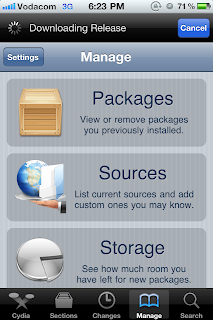
Step 2- open the cydia app and click on manage.
Step 3-click on sources


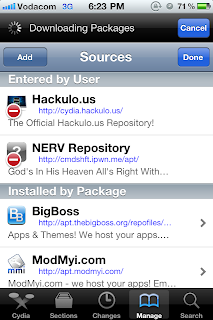
Step 4- click edit on the top right-> now click add on the top left
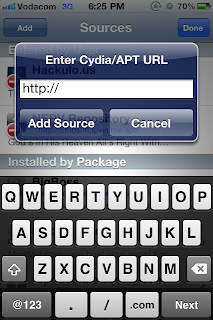
Step 5- insert this URL as a source http://www.sinfuliphonerepo.com/
Step 6- add source
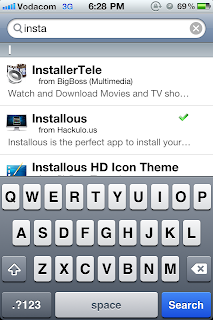
Step 7- go to search and search barrel, you will see two options, click the option that originates from sinful iphone repo.
Step 8- install and you are done.

This method of finding cydia cracks will work on all iphones and will open you knowledge to more paid cydia apps free, please share these new insights if you find any.

Thursday, February 3, 2011

MyWi 4.0: Use your iphone as a wireless router


Something ive managed to do was create a wirless HUB for not only me but everone around me using my iphone as the router, since the first iphone launched people have been interested in tethering. For those of you new to the iphone world, tethering is when you connect your iphone to your pc and use it as a modem, however often you forget your cable at home, this makes using your iphone as a modem useless. However apple has known about a trick to use your iphone over ADHOC connection, this makes your iphone able to tether without need for a cable, but not only can you tether your iphone wireless but you can connect multiple computers and other iphones to use your internet connection over wifi, thus making your iphone a wirless router. Yes i know you proberly very happy about this thought, this means that you can use your iphone as a router to play wireless games between computers and race your friends using NFS over wifi. So there is many uses for using your iphone as a wirless modem, this list continues..


Ok so you proberly thinking cut the short talk and lets get the app already, to get the app you need to purchase it from cydia, however here at FreeiPhoneHub we give you everything free, only if you like the app i suggest you buy it at some stage, or atleast advertise it well like i have. Downloading this app directly from cydia will cost you a whooping $19.99, this price will through off many users interested in buying the features.

In app Key features:
-connect over ADhoc or Bluetooth
-choose the status bar indicator, use the icon( no battery drain)
Or use the blue pulsing bar(10%-15% more battery drain)
-adjust the wifi transmit power, giving you more range
-battery consumption meter
-USB bridge mode
-auto shutoff timer
-shows active users devices name
-WEP enabled keys

Ok now that the review is done, lets get down to getting the app free, i am unable to supply the download link like my other posts, when you downloading from cydia it has to be manule, you cannot drag and drop cydia files into youtube, so appsync doesn’t work with these cydia apps.

However getting this app free is VERY EASY!!
Step 1- if you have not jailbroken your iphone or ipod touch plse follow these steps here.( if you have jailbroken please continue to step 2.)
Step 2- open the cydia app and click on manage.
Step 3-click on sources


Step 4- click edit on the top right-> now click add on the top left
Step 5- insert this URL as a source http://www.sinfuliphonerepo.com/
Step 6- add source
Step 7- go to search and search MyWi 4, you will see two options, click the option that originates from sinful iphone repo.
Step 8- install and you are done.

Sinfuliphone repository is a safe source to download many cydia apps that you would have to pay for, in the same way that apple apps are cracked and published, sinfuliphone is doing the same to cydia apps. This tutorial will lead you to many new free cydia apps, if you have any comments or problems please feel free to ask questions. Also let us know what else you have found free by using my method.

Final Impressions: MyWi 4.0 is the most amazing app i have ever used as far as jailbroken utilities are concerned, there is no other app like this so you might as well go for this app, its one in a million.
I cannot crit this app in a bad way, as it has given us a new way to tether and better than what apple can offer, the reason apple has not approved this app is because they have the same idea to provide use with this very utility in a future version of iphone, i say just like steve jobs made us wait for multitasking he will make us wait for wirelss tethering, but why should we wait for his call, FreeiPhoneHub helps you get features before apple releases them.

Wednesday, November 17, 2010

HOW TO MAKE SKYPE CALLS OVER 3G

As you all know skype doesn’t allow you to make calls over 3G, this is due to service providers will loses to much money, as making DATA calls are much cheaper than standard call rates. So why must we wait for the service providers to allow data calls over skype and other leading VOIP providers. Now you may wonder what is VOIP-( voice over IP) this means calls over ip address. Meaning that you making data calls, don’t get confused with all this abbreviations. All you need to know is that we can make calls over 3g and free of charge provided you have a data plan on your network, if you don’t I advise you get a data bundle from your service provider, as it will cost more to just use standard data fees.
How to bypass skype requesting you to connect to a wireless network to make calls is easy: you need to get MObilesubstrate library that tricks apps into thinking you are on wifi but you are on 3G making it possible to use VOIP apps abroad. This crack will work for all VoIP apps not only skype,but fring aswel ect
Step 1: all you need to do is go to cydia and search for VoIPover3G.

Step 2: click in install on the top right, i have it installed so mine says modify, wait for the crack to finish before you close the app.

Step 3: go back to springboard and make free calls.
Note: this app will not show on springboard as it is just a crack that runs in the files library, no need to switch it on or anything, its all automatic.
Final Impression: this crack is the most usefull crack in cydia, whats nice is that its free, what you get from the app is a rock solid working app that never crashes your iphone or hangs up on calls, it really works well, it’s the 2nd app I install after I’ve jailbroken.
I cant find a fault with the perfect brushed up crack.
Here is a screen shot to show you that im not on wifi but can make 3g calls without an issue.


HOW TO GET FREE APPS iPHONE APPS

Ok ok I know you all are anxious to know how I install any app from the app store free, yes I don’t mean free apps that don’t have a price tag, im talking about all the apps that are really expensive and have a price tag. Many users use this method to gain free apps and test them out, and then if the app is really good I suggest you support the developer and buy the app from the app store even if you can get it for free. The reason for this is to give back to the developer and motivate them to give us a better update and fast, these guys really work hard at giving us decent apps that we can rave on about, so pay for the good apps that deserve the payments.
So how do we get FREE apps? Simple:
Step 1: go to cydia and open manage
Step 2: you will see “sources” click on that.

Step 3: click on edit in the top right, you will be able to add a respository. so click on add.

Step 4: click on add and entre this URL http://cydia.hackulo.us/ in space provided. And click add source

Step 5: you now click on done to stop editing. And go to search at the bottom of the app page.
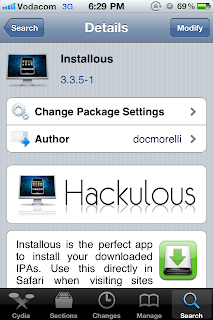
Step 6:search for “installous” and click on it.

Step 7: install at the top right,mine says modify as I have it installed already. Wait for the install to finish and close the app.

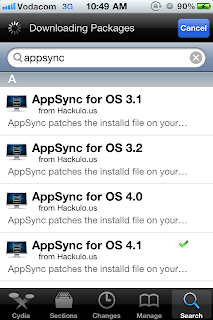
Step 8: search for appsync 4.1 as you have ios 4.1 by now. Imstall this app, you will not see it on springboard, its just a crack to allow you to sync your cracked apps with itunes.

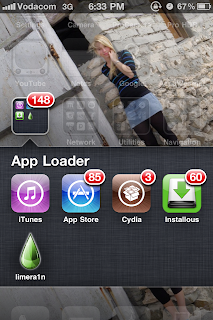
Step 9: go to your springboard and you will see installous app, it looks like this below. In installous you will find most apps that are in the appstore just they are not paid for all are free.

That’s it you now can have free apps as you like. These apps will able to be transferred to your itunes or any friends itunes. And no apple cannot bust you so don’t worry. The other way is to download the apps to your pc from the link below and drag and drop the files into itunes as a whole folder, if you need help doing this method then I can help just email or leave a comment.


myfreecopyright.com registered & protected
Related Posts Plugin for WordPress, Blogger...

 
Powered by Blogger