hey everyone stay tuned for an episode of paris hilton and the latest reveal on how she uses her iphone, this shit is freaky!!!!!!!!!!!


This application that’s in the apple store is a lifesaver if you’re a mom, a manager if you own a company, iCam source has brought you a set of eyes you don’t have, and its mobile . this neat app iCam source uses a webcam connected to a pc to stream over 3g or edge what your webcam can see, the benefits are outstanding, im sure you have your own ideas on how you would use this app, however I use it to watch my office and house gate entrance, so whenever im on holiday I can still see whats going on,. If you have kids you can make sure they get home from skewl at the right time and doing their home work. As I said it’s the eyes you don’t have.
How do we install iCam source on the iphone and how do we configure our pc and router to accept this ping. Follow the steps below to install and configure without any problems, your router configuration is very important and I cannot help anyone with that part unless I get detailed info. However most routers are automatic so don’t worry its worth a try.
Step 1: go to http://skjm.com/icam/support.php and download the windows exe files
on the right of the website, this will give you the software needed to ping through your iphones signals from 3G. this software also connects the webcam with your iphone app.
Install the program.
Step 2: you will be promted to use a username and password, this should match the iphones username and password you will use in the app iCAm source.
Step 3: go to the apple store and download iCam source.
Step 4:make sure that you are on the same wireless network as the pc you doing the installation on. This is important for initial setup, as it finds your iphone on the same network and automatically links them up.
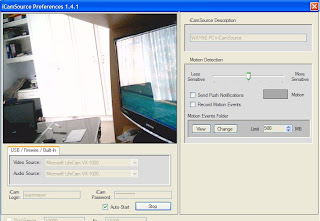
Step 5: you will be asked to use a username and password, please use the correlating username and password used above in the pc installation.
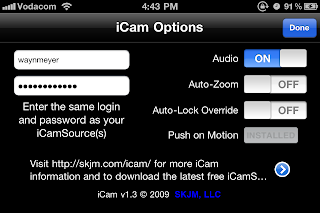
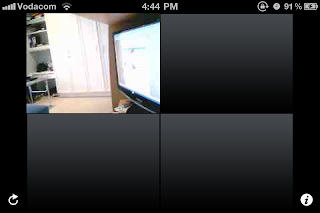
Step 6:you can now watch your web camera on your iphone over 3G

This app tool is the best all in one app with many tools aimed at travellers. What you get with this app is as listed:
-country facts
- where im at
- battery level
-clock
- weather
- shopping (bar code scanner)
-currency converter
-voice reader ( text to speech) helps visually impaired
-tool case (bubble level, flash light,ruler,plumb bob,clinometer)
-cam tools
-unit converter
-device stats
-facebook tool
-gauges
-photo icons
-checklists
-Translator
- nutrition info
-tip calculator
-amazing facts
-magnifier
-metal detector
-compass
You get 23 apps for the price of one, im not going to discuss every one of the apps as some of them speak for themselves. In my blogs we only talk about the best apps the rest we ignore. Upon opening the app i liked the presentation of a briefcase effect, then lies a custom springboard with 20icons listed above. The shopping app is nice for scanning bar codes and checking prices on the go, currency converter is nice if you business orientated and worried about the fluctuation of currency as it might affect you trading cost ect.
Theres a magnifier for the almost visually impaired, it really works well, ive asked my mom to test it aswel, and with success she can see the dinner menu now without asking me to read it out to her, one really good app that works very well is the metal detector, this app uses the compass to detect magnetic field, when it detects a pull then it alarms you, it works to pickup metal scissors through clothes ect, i tried a knife under my desk with the iphone on top and with success it detected it. Nice little app,Voice reader is nice for visually impaired people, it has a paste button there so you can paste any text and it will be read. Facebook tool is very helpfull, facebook app usually can only load one pic or video at a time, this facebook tool can upload a whole album at once. Much more efficient for the heavy user. Gauges is basically a car speed guage that measures speed using gps. Translator is really nice if you abroad and need a fast French or Spanish lesson, will always come in handy trust me. Nutrition info is packed with every kind of consumable you can think of, giving you all the info you need at your fingertips for either maintaining you build or watching sugar, losing wait, body building ect. Helps to know what you consume.amazing facts sounds boring but when you actually bord in the train or bus just pull out this app for some empowerment, there are some really neat facts im suer you all can relate to. Theres a checklist for Christmas shopping or just a daily schedule checklist customize the way you want and tick it when the jobs done. Well there you have it for an app thats got many apps in one of which each cost the price of app genie, id say you got yourself a bargin.


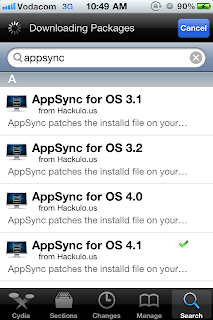
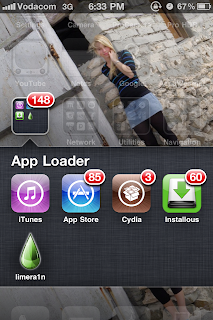
When abroad and you have forgotten something on your desktop pc then you need not to fear jaadu is here. What you can do with this app is simply amazing, RDP stands for remote desktop protocol. What you able to do with jaadu is connect to your desktop over 3G or edge from anywhere in the world and control your pc from it, you can stream music from your pc or play a movie for a friend, you can also send yourself an email of that important document you left behind before your trip. Efficiency is what the new generation is about so RDP sums the word efficiency up in a nutshell.
Basically im forever on RDP not because I forget things while abroad but because I need to access my external harddrive and have the ability to use my pc through my iphone as if I was at my pc.
When setting up such a task you need to have wifi access and router configuration, also needed is to install the pc software in order to get the “ping” pushed from 3G signal wherever you are. So lets start the setup:
-Set up iTeleport
Please read the instruction carefully and install as required, then setup your port number, that should be set automatically. Tick the skip local port search and tick the start with windows. That will help you when you forget to run the software on your pc before you leave home.

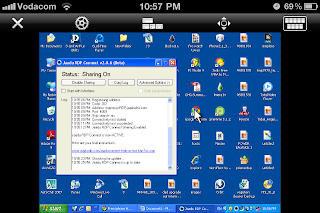
Step 2: you will see the name of you pc once you open the app, make sure your wifi is on and working before you try connect, if you are connected well and the system is running then you will see the name in blue. See below image.
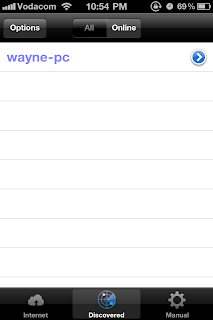
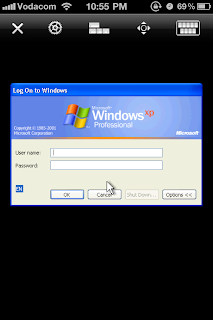
Step 4: once you are logged on then you A for away. Now you can access anything that’s on your pc from anywhere in the world, efficient right? Yes jaadu is very efficient but when it acts as a wireless mouse its even better than expected.
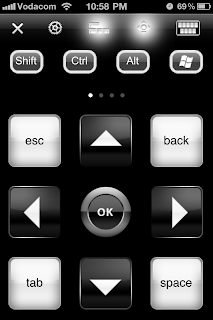
Whats nice about jaadu is it also works as a wireless mouse for your pc if your pc is a media station in your house. You will have the hot keys you need aswel as the keyboard to use your pc as media station. They controls are really huge and easy to navigate, making it easy to use without looking at the screen.
In settings you will find that you can customize this app as much as you need. Rotation lock will keep your screen from rotating when you don’t want it to, touch screen mode is nice for the ipad, but iphone screen is to small to use this feature, however I have big thumbs so maybe for a smaller handed human its better, this touch screen mode will have your mouse disappear and then your input would be to touch whatever you want twice.
If you find that you would like to invert the axis plane in which your mouse moves then you can turn that switch on, it might feel more like home if you find the standard setup a little hard to use. You have the choice to cursor momentum and switch on unicodes, adjusting the resolution is fine if you have a fast connection and unlimited data plan, however the standard resolution is made for best connection and I see no problem with it, so no need to change that. You would obviously leave the audio to play on iphone.

Final impression: this app has saved me many a time and is very usefull, the connection is solid if your connection and network provider is solid, the coding of the program is fast in directory, I would say this app rates a 4/5, reason I wouldn’t give this app a 5/5 is that the interface needs better integration of accelerometer controls to move the mouse and needs to double up as a pointer for powerpoint presentation ect. The future updates will be intresting as this app is the best RDP app in the app store.


From a critics point of view, I see some issue with the goals on how they are scored and how you cant control the keeper to block the goal, the computer makes the choice for you, so its like a luck kind of situation, the closer you get to the goal the easier it is to score. What would be nice to see in a update is to have the goal kick instantly slowed down and give you a view from a goalies point of view and give you time to choose where you “think” the ball will land, in the mean time the striker must choose his choice to score where in the box, this will form a better player relation and cause a hoax of guesses with a new way of thinking and how you read you opponent.


